Network security scanner · CVEs · end of life · installed on your premises

A CVE drops. Are you actually exposed?

I7think finds every device on your network without installing anything on it. For each known flaw (CVE), it checks the version actually installed and tells you, device by device, whether it is exploitable, and why. It also warns you a year before your hardware reaches end of support.

verdict · CVE-2021-45951test network
CVE-2021-45951 dnsmasq · CVSS 9.8 · critical
TechniqueOut-of-bounds memory write
Fleet affected1 device out of 21
Version seengen_2.86 · inside the affected range
ISP routerEXPLOITABLE · port 53, no credentials
srv-nas-01NOT EXPLOITABLE · fixed version
printer-gfNOT AFFECTED · no dnsmasq
→ added to "To fix" with high priority · alert sent

At a glance

Everything your network says, turned into decisions.

I7think looks at your network from every angle, brings everything into a single engine and tells you what to do, instead of burying you in alerts.

What I7think reads

  • Network scan
  • SSH audit
  • Inventory
  • Security advisories
  • Versions and firmware
  • Configurations
  • Login logs
  • End of support
  • Hardening guides
  • Certificates
  • ANSSI · ISO · NIS 2 frameworks

What it does with it

decision engine
  1. 01Living inventoryevery device, its version, its services
  2. 02Exploitability verdictis the flaw really exploitable here, and why
  3. 03Findings and local AIproblems you only see by crossing the data
  4. 04Fix for each devicewhat to install and how, for each device

What you gain

  • Know what really runs on your network
  • Fix first what is exploitable on your network
  • Fewer false alerts, more time
  • Show your efforts (ISO, ANSSI, NIS 2)
  • Installed on your premises, your results stay there
  • An analysis that improves with every scan

The platform

Everything revolves around one engine: the verdict.

All of I7think serves one goal: telling you, for each flaw, whether it really threatens you. Everything else follows from that.

Step 1 · Inventory

Know

I7think lists everything plugged into your network (servers, workstations, phones, routers, printers) and, for each device, its system and software with their version.

Step 2 · Vulnerabilities

Understand

For each known flaw (CVE), I7think tells you whether attackers already exploit it, how likely it is to be exploited, and which security rules are involved.

The core · Inventory × vulnerabilities

Decide

I7think matches the inventory against the vulnerabilities. For each device, it tells you whether the flaw is really exploitable on your network, and explains why. Same facts, same verdict, every time.

Step 3 · The fix

Act

Every flaw to handle goes into the "To fix" list with the right fix: the update to install, the command to run or the setting to change. At the next scan, I7think checks that the flaw is really gone.

The interface

Seen from the inside.

Real screenshots, taken on a small test network (21 devices), French interface; the whole app is also available in English. Identifying addresses are masked.

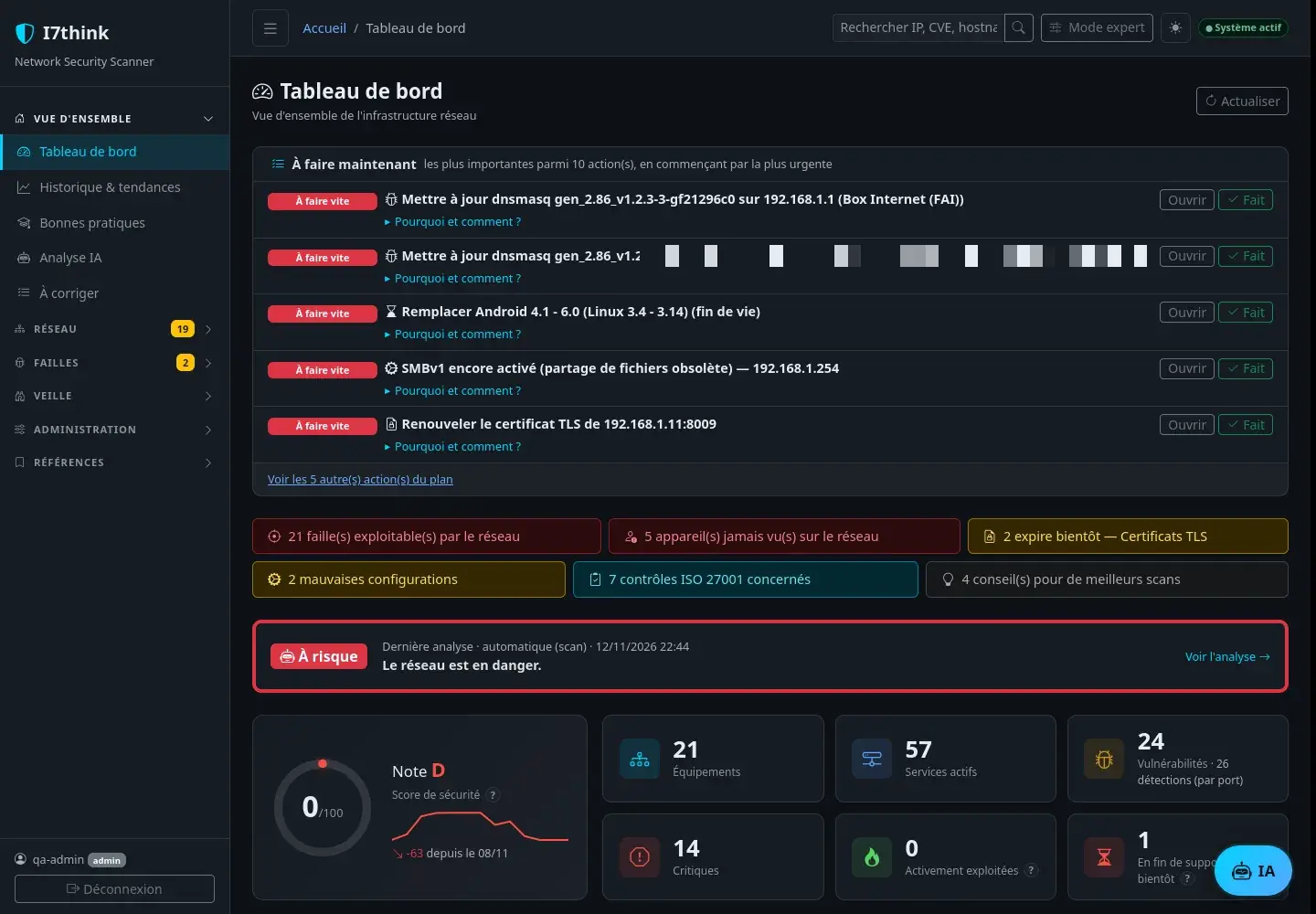
I7think dashboard: 'To do now' list, alerts, security score and fleet counters
DashboardWhat to do now, the fleet score and its trend, today's alerts.
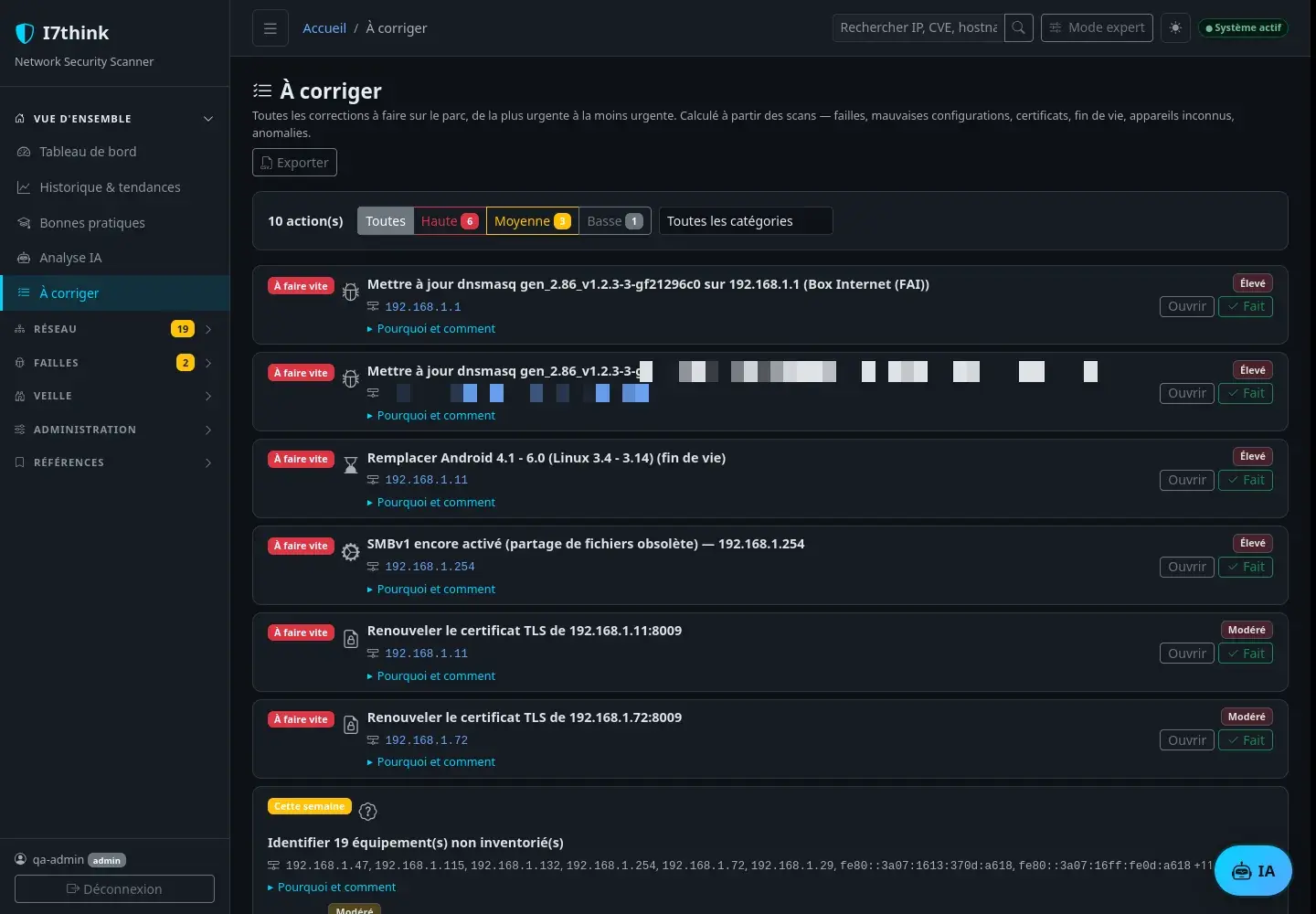
'To fix' page: every remediation on the fleet, filterable by priority and category
To fixEvery remediation on the fleet, from most to least urgent, with the why and the how.
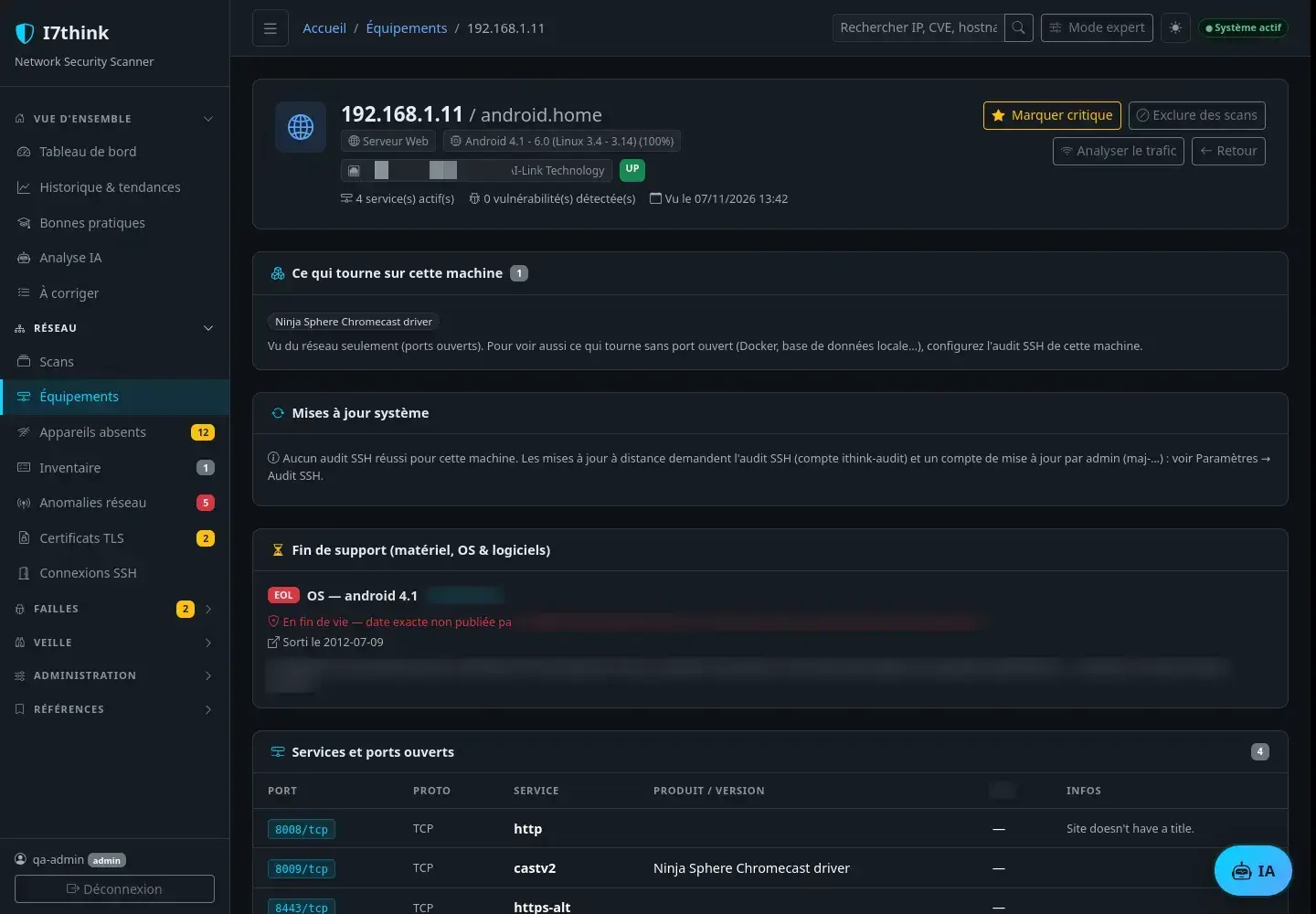
Device page: type, model, system, software, pending updates, end of support, attack paths, open services and flaws with their fix
Device pageEverything I7think knows about a machine: type, model and system; installed software and pending updates; end of support for hardware, system and software; open services and SSH logins; attack paths; and every flaw with its verdict and its fix.
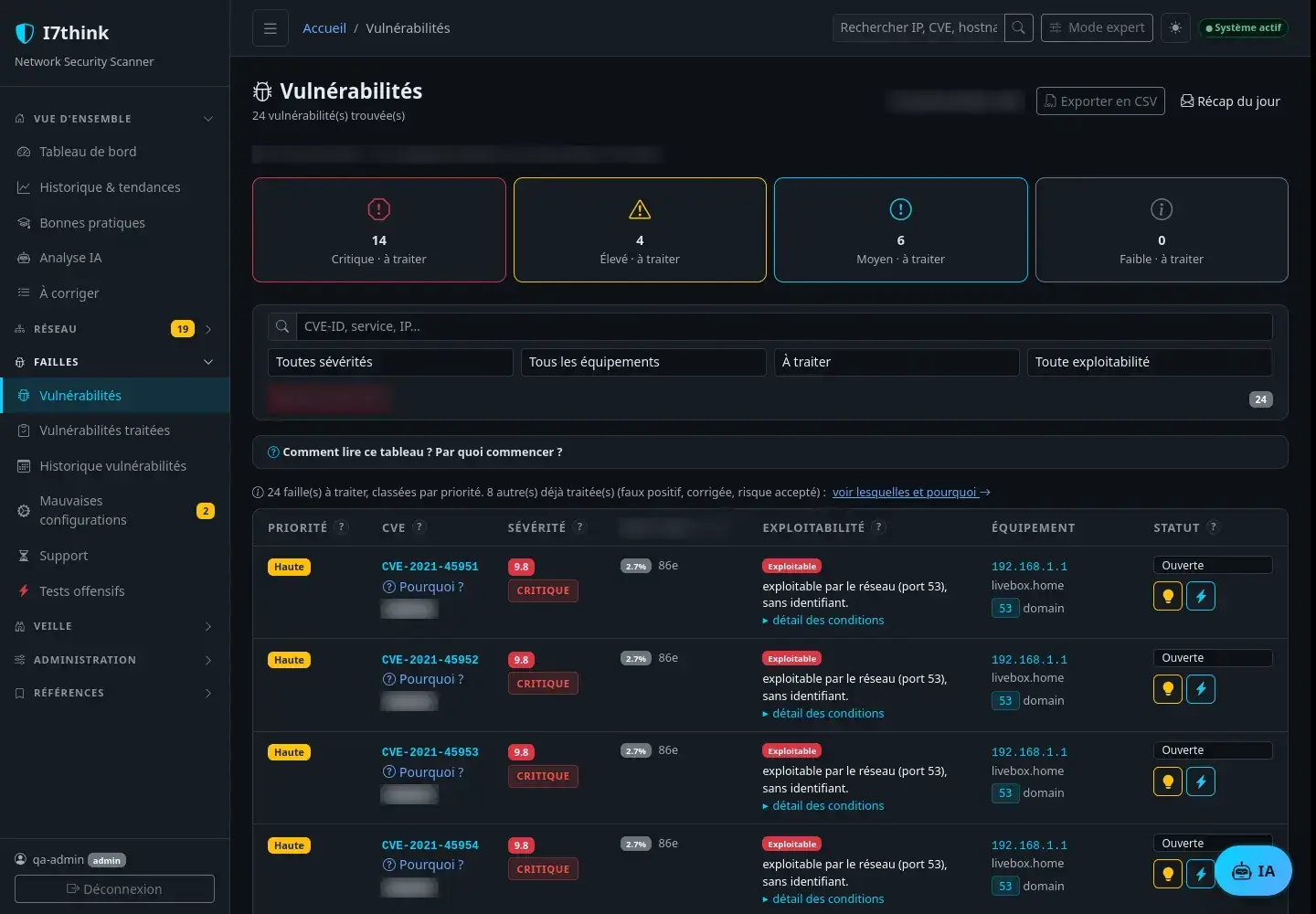
Vulnerability list with priority, exploitation probability, active exploitation and justified exploitability verdict
VulnerabilitiesEach CVE with its priority, its exploitation probability, and its exploitability verdict explained in one sentence.
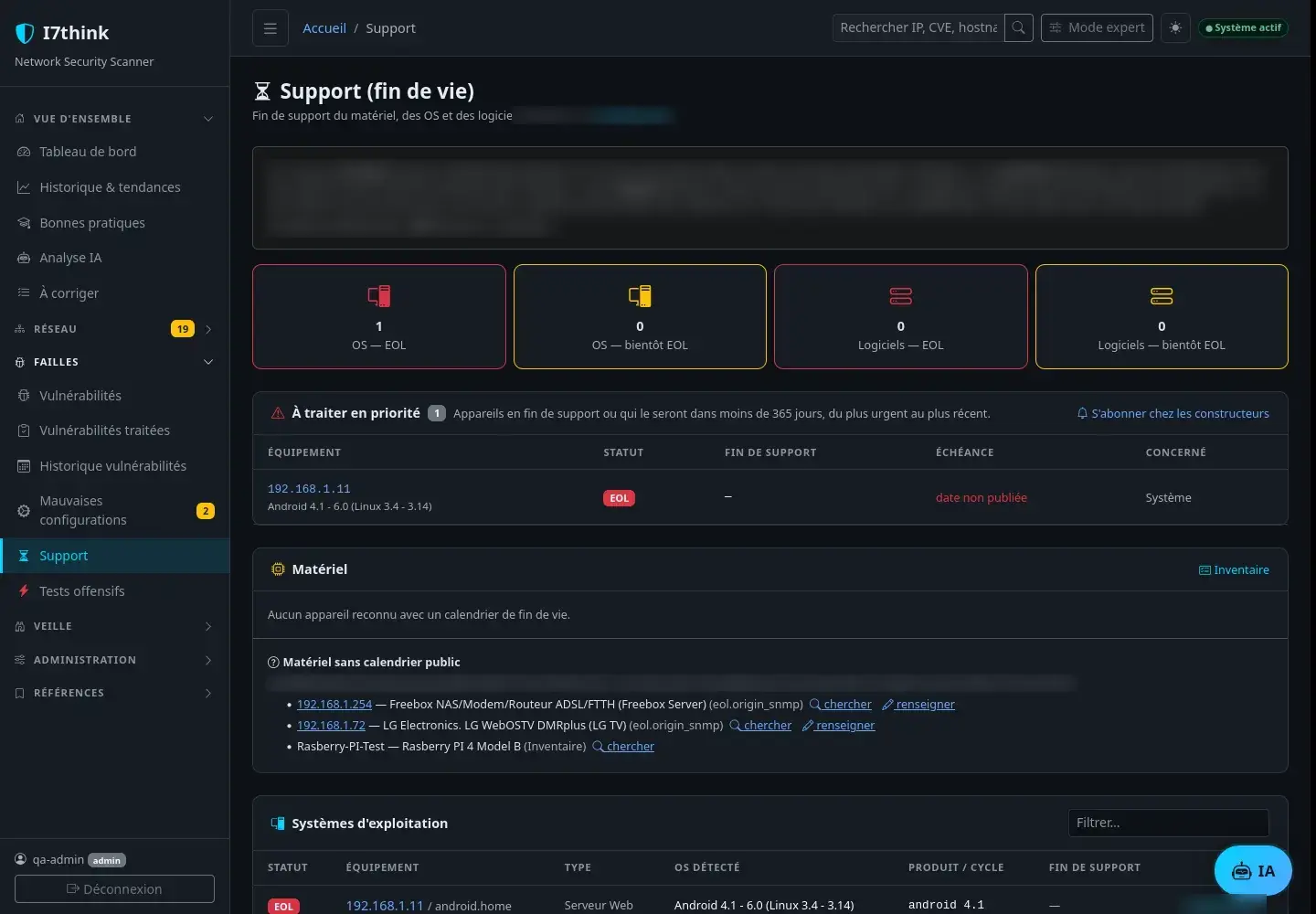
Support page: end of life of hardware, systems and software, to handle first
End of lifeHardware, systems and software out of support or reaching it within the year, most urgent first.
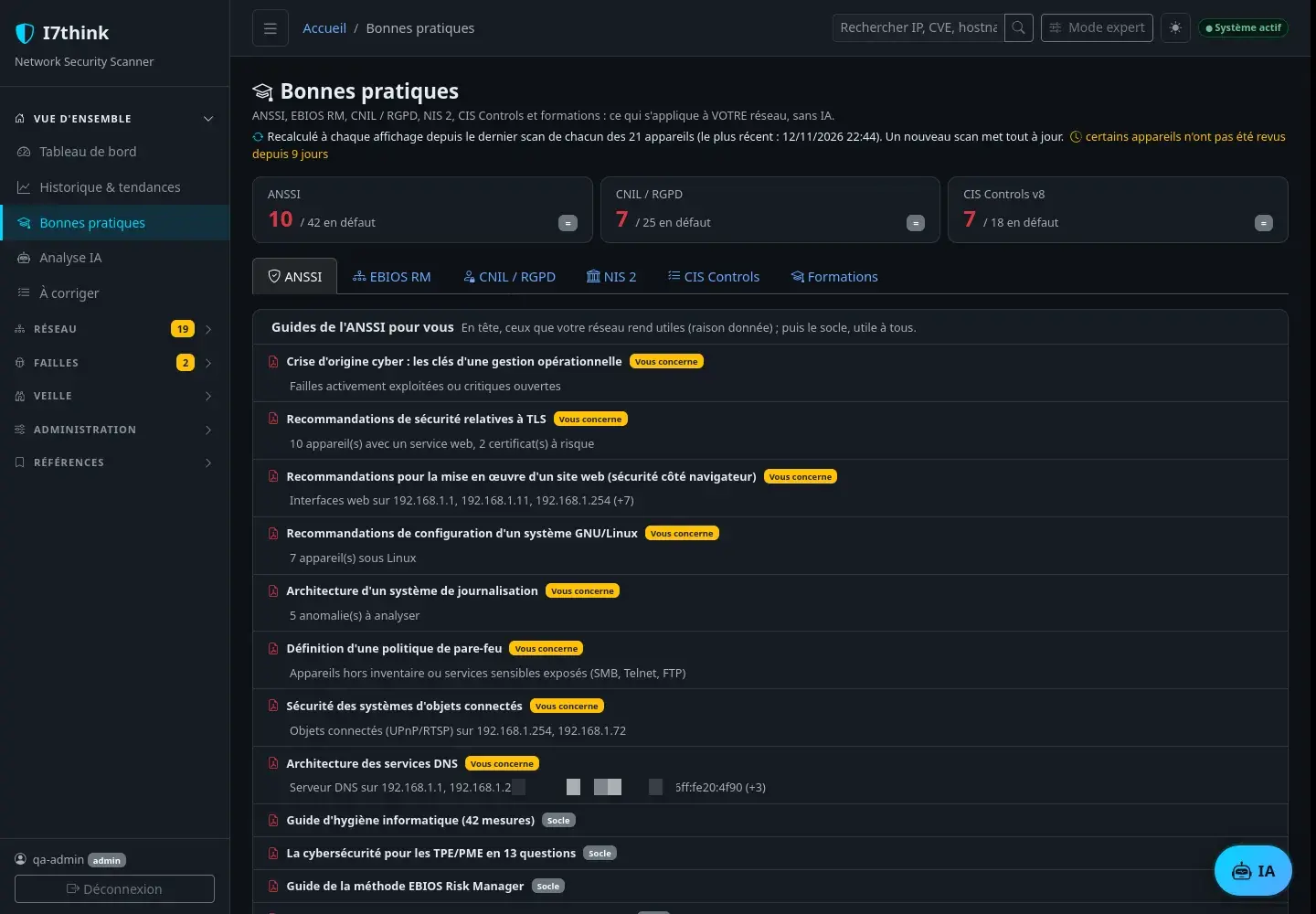
Good practices page: ANSSI guides that apply to your network, with the reason
Good practicesANSSI, EBIOS RM, CNIL, NIS 2, CIS: what applies to your network, recomputed at every scan, with the reason.

Local AI

An AI that reads CVE entries for you, without sending anything out.

I7think's AI is an in-house model that runs on your premises, on the I7think machine or on another machine on your network. Already have your own AI? I7think can use it instead. No CVE, no inventory, no verdict ever goes to an outside AI.

Everything works without it: verdicts are returned by the engine, not by the model.

  • It extractsThe exploitation conditions of a CVE, with the exact quote from the entry, checked word for word.
  • It assessesThe security state of your fleet: an overall opinion, the priorities and the relevant ANSSI / ISO references.
  • It explainsHow to fix, machine by machine, in concrete steps.
  • It noticesWhat you only see by crossing the data: repeated login attempts, a flaw back after being fixed, a machine unlike its peers, the same vulnerable software on several machines.
  • It improvesFrom one analysis to the next, it tracks what is settled and what drags on, and takes your feedback into account. Your data is never used to train a model.
  • It answersYour questions, from any page, with the context of the machine on screen.
  • It does not decideWhen a verdict depends on what the AI read, it carries the badge "AI, to confirm".

Features

From raw network to decision, in a single tool.

No more scanner on one side, tracking spreadsheet on the other and vendor advisories in ten tabs. Here is what I7think does, in detail.

01

Agentless network discovery

I7think sees everything that is plugged in, not just servers: phones, routers, TVs, printers, powerline adapters, consoles, connected objects.

  • Three scan profiles (quick, standard, deep), nmap, 19 UDP probes, SSDP/UPnP and mDNS
  • Passive listening to catch devices that sleep (Wi-Fi power saving)
  • Type and model identified: router, set-top box, TV, printer, mobile…
  • Missing devices flagged after 7 days, retired from the fleet after 30, never deleted
02

Read-only SSH audit

With a read-only account, I7think reads what a scan cannot see from the outside, without installing anything. It works on most devices: Linux, Windows and Mac servers and workstations, ESXi hypervisors, routers, switches and firewalls (Cisco, Fortinet, Stormshield, Juniper, MikroTik, Palo Alto, Huawei, HPE / Aruba, Arista).

  • Installed packages, pending updates and fixes backported by the distribution (Ubuntu, Debian…)
  • Effective SSH server configuration, not just its version
  • What runs without an open port: Docker, databases, local services
  • Routers, switches and firewalls: exact firmware version and model, then the flaws of that precise version
  • For each firmware flaw: the version to install and the steps to follow. Once the device is up to date, the flaw closes by itself
  • Dangerous settings spotted (admin access open to the Internet, cleartext administration, SSH v1), with the exact command to fix them
  • Ready-to-copy commands to create the read-only account, brand by brand
  • No write access, no configuration command
03

CVE enrichment

A raw CVE says almost nothing. I7think completes it with what matters to decide.

  • Affected version ranges, observed active exploitation, exploitation probability
  • Security alerts and bulletins of the vendors in your fleet
  • Exploitation conditions read by the local AI, with a verified quote
  • Associated attack techniques and countermeasures
04

Exploitability verdict

The heart of I7think. Not "you have 24 critical CVEs", but "this one is exploitable from the network, without credentials, on this router".

  • Four verdicts per device × CVE pair: exploitable, conditional, local, not exploitable
  • Each flaw's conditions compared with what is actually observed (ports, compression, GSSAPI, HTTP/2…)
  • Justification shown for every verdict, never a black box
  • Your decisions (false positive, accepted risk) survive rescans, with their reason
05

Fleet end of life

A device that no longer receives fixes is a permanent vulnerability. I7think sees it before you do.

  • Three dates per device: end of support, end of security fixes, end of sale
  • Configurable warning, one year ahead by default, most urgent first
  • End-of-life dates updated daily; for brands without a public calendar (Cisco, Meraki, Dell…), links to their pages and subscriptions
  • Manual entry in the inventory when the vendor publishes nothing
06

Misconfigurations and certificates

Many incidents come not from a CVE but from a forgotten setting.

  • SMBv1, Telnet, FTP, missing SMB signing, open shares
  • Application probes: exact versions and passwordless access (Docker, Redis, MongoDB, VNC, cameras…)
  • Expired or expiring TLS certificates, self-signed ones
  • Network anomalies and attack paths: the flaw to fix first to break the chain
07

"To fix" and fix guide

Every remediation on the fleet in a single prioritised queue. Each line says why, how, and what to rely on.

  • Vulnerabilities, misconfigurations, certificates, end of life, unknown devices, anomalies
  • Concrete steps per device, commands or vendor procedures
  • "Done" deletes nothing: the fix is confirmed by the next scan
  • CSV export for the committee or the ticketing tool
08

Standards and compliance

Every action is linked to the texts it serves, to speak the language of the CISO and the auditor.

  • ANSSI (hygiene guide, 42 measures), EBIOS RM (likelihood × severity), ISO/IEC 27001 · 27002 · 27005
  • NIS 2 (art. 20, 21, 23), CNIL / GDPR (art. 32 to 34), CIS Controls v8, ITIL change type
  • "Good practices" page: the guides that apply to your network, with the reason, recomputed at every scan
  • Exportable compliance report
09

Tracking, alerts and integrations

The verdict does not sit in a table. It finds you.

  • Security score, history and trends, daily report by email (provisional, then final)
  • Slack, Discord or webhook alerts: new device, actively exploited flaw appearing on the network, end of support, vendor bulletin
  • Automatic reminders for unfixed flaws: deadline set per severity (7 days for a critical one by default), reminded until fixed
  • REST API with revocable keys (read-only or full), CSV exports everywhere
  • Bilingual French / English interface, simple and expert modes
10

System updates, if you decide so

For every flaw, I7think suggests the right fix: version to install, ready-to-copy command, or steps to follow on the device. By default it changes nothing itself. As an option, it can install updates on a Linux server with dual approval: an operator requests, an administrator approves.

  • An operator requests, an administrator approves with the passphrase of their own key
  • One account per administrator on the machine, limited to a single command
  • The app never stores the passphrase: even with the database stolen, no update can be launched
  • A scan is re-run after the update to verify

In practice

Three steps, zero spreadsheet.

The short version. The seven phases are detailed on the How it works page.

  1. Step 1

    Scan

    I7think discovers the network, identifies every device and reads versions and configurations. The SSH audit adds what can only be seen from the inside.

  2. Step 2

    Understand

    Each flaw is compared with the versions actually installed and gets an explained verdict. End of life and misconfigurations are added.

  3. Step 3

    Fix and prove

    You fix from the "To fix" list, the alerts keep you informed, and the next scan confirms. The history serves as proof for the audit.

Red Team & Blue Team

One source of truth, two ways to use it.

Offence and defence work on the same flaws, rarely with the same data. I7think gives both teams the same verdict, read from their angle.

Red Team · offensive

Know where to look before the first test.

Pentesters save the reconnaissance time: what is really exploitable is already spotted, technique by technique.

Prioritised targets
The list of devices with an "exploitable" verdict, sorted by severity, probability and observed active exploitation, is the starting point of the scope.
Attack paths
On a given machine, which flaw gives a foothold and which one allows going further: the scenario is built on facts, classified by attack technique.
Documented conditions
Installed version, reachable port, credentials required or not: each verdict explains why the flaw is exploitable here.
Built-in tools
"Offensive tests" page to run Nuclei, ZAP or a capture from the interface, on machines you are responsible for, with a log.
Fix validation
After remediation, the next scan recomputes the verdict: the Red Team confirms it really changed.

"On this scope, which flaws are exploitable from the network today?"

Blue Team · defensive

Patch what matters, detect the rest.

SOC, infra and operational security teams stop processing CVE lists: they process a queue of actions, already prioritised.

"To fix" queue
Only useful actions surface, with the priority, the EBIOS RM rating and the ANSSI or ISO reference that justifies it.
Coverage by technique
The attack techniques opened by unfixed flaws and the associated countermeasures, to check that detection sees them.
Lasting decisions
False positive, accepted risk, fixed: the decision survives rescans, with its author and reason.
Useful alerts
New unknown device, actively exploited flaw appearing on the network, end of support within the year: on Slack, Discord or by email.
Tracking to the proof
Score, history, daily report, compliance report: ready for the security committee and audits.

"What do I need to fix this morning, and what reaches end of life this year?"

Purple Team

The full loop, in the same tool.

When offence and defence share the same reference, every exercise durably improves the security level instead of ending in a PDF.

  1. I7thinkReturns the verdict: the flaw is exploitable on this device, here is why.
  2. Red TeamVerifies and documents the attack technique used.
  3. Blue TeamChecks that detection fired, then fixes or compensates.
  4. Red TeamReplays the test to validate the fix.
  5. I7thinkRescans, recomputes the verdict and records the remediation in the history.
The same CVE, read by each role
RoleWhat they look forWhat I7think gives them
Pentester / Red TeamA realistic entry pointExploitable devices, exploitation conditions, attack technique, attack paths
SOC analystKnowing what to watchTechniques opened by unfixed flaws, countermeasures, active-exploitation alerts
System / network adminKnowing what to fix, and how"To fix" queue, suggested fix for every flaw, updates with dual approval
CISOMeasuring and provingScore, trends, compliance report, ANSSI / ISO / NIS 2 references per action

Security

A tool that knows your flaws must be beyond reproach.

I7think holds the inventory of your fleet and the list of what is vulnerable on it. Here is how that data is protected. The full detail is on the Security page.

On your premises

Installed on your machine

I7think runs on a server or a Raspberry Pi on your network. Your inventory and your results stay on your premises.

  • No account with a third party, no shared hosting
  • Listens locally by default, HTTPS behind your reverse proxy
  • Runs without root privileges
Encryption

Encrypted database, key kept apart

The database is encrypted with SQLCipher; the key is stored separately.

  • A stolen copy of the file is unreadable without the key
  • API keys and service passwords masked in the interface
  • Update key passphrases never stored
Access

Least privilege

Everyone sees only what they need.

  • Roles: read-only, operator, administrator
  • Mandatory two-factor authentication (TOTP, recovery codes), OpenID Connect SSO
  • Scoped, revocable API keys; lockout after repeated attempts
Traceability

Audit log

Every action is attributed and timestamped.

  • Logins, scans, settings changes, exports, pushed updates
  • Every decision on a flaw keeps its author and reason
  • Log exportable as CSV
Read-only

I7think observes, it does not change

The SSH audit account cannot break anything. Remote updates are an option, with dual approval: an operator requests, an administrator approves.

  • Dedicated account, key only, read-only; sudo limited to two read scripts
  • Updates: requested by an operator, approved by an admin with a passphrase
  • The AI model has no tools: it runs nothing
Its own medicine

I7think audits itself

The libraries it depends on are checked like your fleet.

  • Weekly audit of its own libraries
  • Flaws ranked like yours, "Self-check" page
  • Vulnerability reporting: securitithink@tutamail.com
Zoom: SSH access

A collection account that cannot break anything.

The SSH audit is the most sensitive point, hence the most constrained: a dedicated account, no password, key authentication, accepted only from I7think's address, no interactive shell or port forwarding. The setup script is generated by I7think; you read it before running it, and you remove the account with one command.

# audit account, generated by I7think
user      ithink-audit
auth      ed25519 key only, password disabled
rights    read-only; sudo limited to 2 read scripts
reads     packages, sshd -T, login logs
source    I7think address only
removal   sudo bash ithink-audit-setup.sh --uninstall

Plans

Five plans, from the first trial to the full fleet.

The verdict engine, network discovery and end of life are in all five. Each plan includes the previous one and adds what is listed. Price per device per month, 50 devices minimum, −20% above 500.

Plan 1 · trial

Discovery

To judge I7think on your own network, no commitment.

2 weeksTrial duration, on a limited scope

Included
  • Up to 50 devices
  • Agentless network discovery, on-demand scans
  • Continuous CVE monitoring
  • Justified exploitability verdict
  • Fleet end of life
  • Dashboard, encrypted database, MFA
Not included
  • Local AI
  • Alerts, daily report, API
Start the trial
Plan 2 · base

Essential

For a small team or a small fleet.

€8per device per month

Everything in Discovery, no time limit, plus:
  • From 50 devices
  • Scheduled scans and SSH audit
  • "To fix" queue and fix guide
  • Misconfigurations, certificates, inventory and groups
  • ANSSI / CNIL / NIS 2 good practices
Not included
  • Local AI
  • Alerts, daily report, API
Choose Essential
Plan 3 · production

Team

For an infra or security team managing its fleet every day.

€15per device per month

Everything in Essential, plus:
  • Local AI: exploitation conditions, posture analysis, assistant
  • Slack / Discord / webhook alerts, daily report by email
  • REST API with revocable keys
  • Roles, audit log, SSO
  • Vendor monitoring and compliance report
Choose Team
Plan 4 · SOC

Advanced

For a SOC, a Red Team or a Blue Team.

€25per device per month

Everything in Team, plus:
  • Attack paths, techniques and countermeasures
  • "Offensive tests" page (Nuclei, ZAP, captures)
  • System updates with dual approval (request + approval)
  • Active Directory synchronisation
  • EBIOS RM rating and ISO 27001 controls per action
Choose Advanced
Plan 5 · tailored

Enterprise

For large fleets, several sites or specific requirements.

On quotedepending on fleet size and options

Everything in Advanced, plus:
  • Unlimited devices
  • Several sites or networks, one instance each
  • Custom connectors
  • Guided onboarding and a dedicated contact
Contact us

Detailed comparison

Everything included, line by line.

FeatureDiscoveryEssentialTeamAdvancedEnterprise
Scope
Duration2 weeksSubscriptionSubscriptionSubscriptionSubscription
Devices50 max50 minimum50 minimum50 minimumUnlimited
Price per device / monthFree€8€15€25On quote
Above 500 devices—−20%−20%−20%−20%
Fleet
Agentless network discoveryOn demandScheduledScheduledScheduledScheduled
Read-only SSH auditNoYesYesYesYes
Inventory, groups, group scanNoYesYesYesYes
End of life (three dates, one-year warning)YesYesYesYesYes
Several sitesNoNoNoNoYes
Analysis
Continuous CVE monitoringYesYesYesYesYes
Justified exploitability verdictYesYesYesYesYes
Dashboard and scoreYesYesYesYesYes
Misconfigurations, certificatesNoYesYesYesYes
"To fix" queue, fix guideNoYesYesYesYes
ANSSI / CNIL / NIS 2 good practicesNoYesYesYesYes
Attack paths, techniques, countermeasuresNoNoNoYesYes
EBIOS RM rating, ISO 27001 controlsNoNoNoYesYes
Local AI
Exploitation conditions read by the AINoNoYesYesYes
Posture analysis and fix stepsNoNoYesYesYes
Assistant (natural-language questions)NoNoYesYesYes
Automation
Slack / Discord / webhook alertsNoNoYesYesYes
Daily report by emailNoNoYesYesYes
REST APINoNoYesYesYes
System updates with dual approvalNoNoNoYesYes
Red Team & Blue Team
"Offensive tests" pageNoNoNoYesYes
Fix validation by rescanYesYesYesYesYes
Security and access
On your premises, SQLCipher-encrypted databaseYesYesYesYesYes
Two-factor authentication (TOTP)YesYesYesYesYes
Roles and audit logNoNoYesYesYes
SSO (OpenID Connect)NoNoYesYesYes
Active Directory synchronisationNoNoOptionYesYes
Support
Email supportAnswer within 1 weekAnswer within 1 weekAnswer within 48 hAnswer within 48 hAnswer within 24 h, dedicated contact
Guided onboardingNoNoOptionOptionYes

Options

To add to the Team, Advanced and Enterprise plans depending on your context. Per-device modules cost €4 to €8 per device per month. Discovery and Essential stay deliberately simple.

OptionWhat it bringsTeamAdvancedEnterprise
Active Directory synchronisationMachines and accounts imported from your directory, joiners and leavers managed on your side.+€4 to +€8IncludedIncluded
Guided onboardingInstallation, SSH audit account, first scans and first alerts, done with you.OptionOptionIncluded
Internet-isolated environmentInstallation without Internet access, sources updated by import. On study.+25%+25%+25%
Purple Team workshopA guided offence / defence exercise, built on the verdicts of your fleet.OptionOptionOption
Custom connectorIntegration with a ticketing or patch management tool not covered by the webhook or the API.NoOptionIncluded
Monthly commented reportA summary of exposure and trends, ready for the security committee.OptionOptionOption

FAQ

The questions we get asked.

Do I need to install an agent on my devices?

No. Discovery happens over the network: I7think sees everything that is plugged in, including things you cannot install anything on (phones, routers, printers, TVs). On devices reachable over SSH (servers, workstations, routers, switches and firewalls from the main brands), a dedicated read-only account completes the view, without deploying anything.

How is this different from a vulnerability scanner?

I7think is a scanner, but it does not stop at the list. It tells you which CVEs are actually exploitable on your network and why, links every action to the standards (ANSSI, NIS 2, ISO), watches hardware end of life, and only closes a fix when the next scan observes it.

Does I7think apply fixes itself?

Not by default: for every flaw it suggests the right fix (version to install, ready-to-copy command, steps on the device), and you apply it. As an option, it can install updates on a Linux server with dual approval: an operator requests, an administrator approves with the passphrase of their own key, which the app never stores.

Is I7think an offensive or a defensive tool?

Both. The Red Team uses it to target and validate, the Blue Team to prioritise, detect and fix. The verdict engine exploits no flaw: it tells where they are actually exploitable. The "Offensive tests" page is reserved for machines you are responsible for.

Is my data sent to an external AI?

No. I7think's AI is local, on your machine or a machine on your network, with no call to a third-party service. Your data is not used to train any model, and everything works without it.

What is "end of life" and why is it in a CVE tool?

A device or system that no longer receives security fixes will stay vulnerable to every future flaw. I7think shows three dates per device (end of support, end of security fixes, end of sale) and warns you a year ahead, so you replace before it becomes a problem.

Where is my data stored?

On your premises, on the machine where I7think is installed, in a database encrypted with SQLCipher whose key is stored separately. No cloud, no shared hosting.

Can I plug I7think into my tools?

Yes: alerts to Slack, Discord or any webhook, daily report by email, CSV exports everywhere, and a REST API with revocable keys, from the Team plan.

What happens after the 2-week Discovery plan?

The trial stops. You can export your data, or move to a paid plan keeping your inventory, verdicts and history, without rescanning anything.
About

An independent tool, built by a practitioner.

I7think is designed and developed in France by an independent entrepreneur, starting from a simple observation: scanners produce lists, teams need decisions.

No investors to please and no data to resell: the product is funded by its customers, and your data stays with you.

  • IndependentNo ties to a security vendor or a cloud provider.
  • Made in FranceDesigned around French frameworks: ANSSI, EBIOS RM, CNIL, NIS 2.
  • DirectYou talk to the person who writes the code: i7think@tutamail.com.
  • TransparentWhat the tool does, what it does not do, and what stays on your side are written in black and white.

Stop sorting CVEs by hand.

Tell us the size of your fleet, we'll open an access for you.

Request access

or write directly to i7think@tutamail.com